> For the complete documentation index, see [llms.txt](https://wiki.mypet-plugin.com/llms.txt). Markdown versions of documentation pages are available by appending `.md` to page URLs; this page is available as [Markdown](https://wiki.mypet-plugin.com/setup-guide/skilltree-creation/creating-custom-skilltrees/properties.md).
# Properties
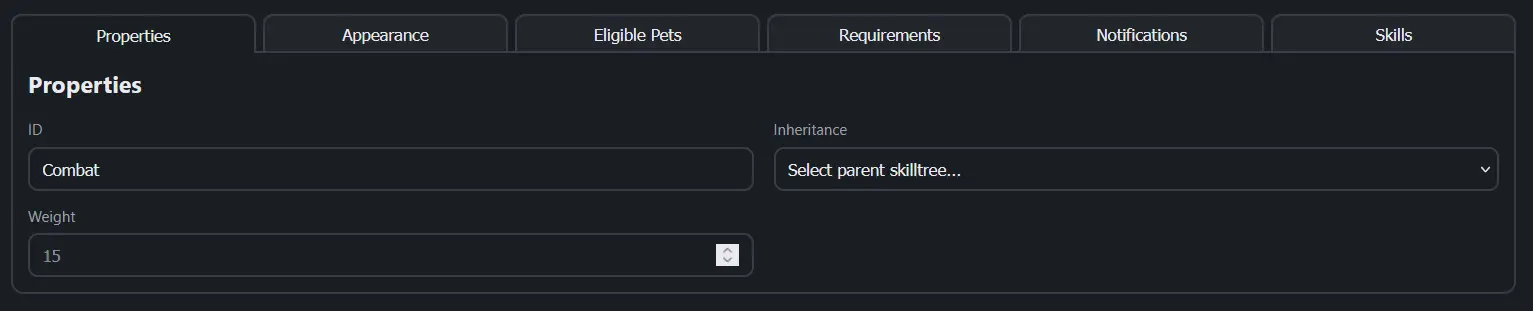
The `Properties` section of the [Configurator's](/setup-guide/skilltree-creation/creating-custom-skilltrees.md) Inspector allows you to configure the skilltree ID, Inheritance, and Weight.
### ID
The skilltree `ID` is the internal identifier used by the plugin. It is the same identifier used when selecting a skilltree using the `/petchooseskilltree [ID]` command. It is advisable to make this ID the same as the Skilltree Name in the [Appearance](/setup-guide/skilltree-creation/creating-custom-skilltrees/appearance.md) section.
### Inheritance
This option allows you to select a *parent* skilltree that the current (*child*) skilltree will inherit from. The child skilltree will then contain all of the parent skilltree's skills **plus its own skills**. This can allow for many options including the use of a base set of skills that are built upon by several child skilltrees.
For example, if `Skilltree A` is our *parent* skilltree and `Skilltree B` is our *child* skilltree, and `Skilltree A` contains the [Backpack](/setup-guide/skilltree-creation/creating-custom-skilltrees/skills/backpack.md) skill at Level 2 but *does not* contain the Pickup skill, but `Skilltree B` contains the [Pickup](/setup-guide/skilltree-creation/creating-custom-skilltrees/skills/pickup.md) skill at Level 2, then pets with just `Skilltree A` at Level 2 would **only** have the Backpack skill while pets with `Skilltree B` at Level 2 would have **both** Backpack and Pickup skills.
### Weight
The Skilltree `Weight` sets the relative probability of this skilltree being picked when a skilltree is assigned randomly (`MyPet.Skilltree.RandomAssignment` in [config.yml](/setup-guide/getting-started/configuration/config.yml.md#skilltree)). Higher values make the tree more likely; the default is `1.0`.
Since MyPet 4 the weight can also differ per pet type by writing a map instead of a number in the `.st.json` file:
```json
"Weight": {
"Default": 2.0,
"Horse": 3.0
}
```
`Default` applies to every pet type without an explicit entry. The Configurator's Weight field currently edits the single-number form; per-type weights are maintained directly in the file.
---
# Agent Instructions
This documentation is published with GitBook. GitBook is the documentation platform designed so that both humans and AI agents can read, navigate, and reason over technical content effectively. Learn more at gitbook.com.
## Querying This Documentation
If you need additional information that is not directly available in this page, you can query the documentation dynamically by asking a question.
Perform an HTTP GET request on the current page URL with the `ask` query parameter, and the optional `goal` query parameter:
```
GET https://wiki.mypet-plugin.com/setup-guide/skilltree-creation/creating-custom-skilltrees/properties.md?ask=&goal=
```
`ask` is the immediate question: it should be specific, self-contained, and written in natural language.
`goal` is optional and describes the broader end goal you are ultimately trying to accomplish on behalf of the user. GitBook uses it to tailor the answer towards what is most useful for that goal.
The response will contain a direct answer to the question and relevant excerpts and sources from the documentation.
Use this mechanism when the answer is not explicitly present in the current page, you need clarification or additional context, or you want to retrieve related documentation sections.